
ArrowEscape guide: find clear paths and save your hearts
ArrowEscape is an arrow puzzle game about clearing a board in the right order. Click or tap an arrow to send it along the direction of its tip. The route ahead must be clear: another arrow’s body can block it just as effectively as another arrowhead.
Follow the tip, then inspect the whole route
Start at the selected arrow’s tip and trace a straight line forward. Do not follow its tail backward or assume a bent arrow will steer around an obstacle. Check every line segment along the exit route before tapping.
An arrow near the outside is not automatically free. If its tip points inward, it may face several blockers. Conversely, a long shape can have a simple open exit. Direction and occupancy matter more than the size of the arrow.
A first-level example: remove the upward arrow first
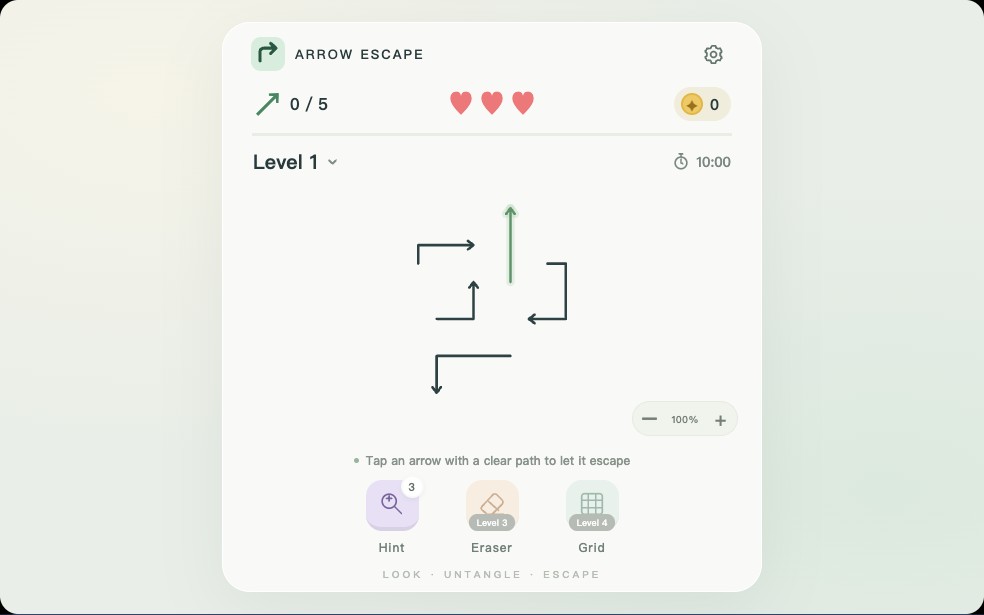
In the screenshot, the upright arrow near the center points into open space. The bent arrow to its left points right, directly toward the upright arrow’s body. Trying the right-pointing arrow first meets that obstruction.
Remove the upward arrow, then check the horizontal route again. The space it occupied is now empty, so the left arrow has a way forward. This small dependency is the pattern to look for on a crowded board: identify what blocks an arrow, then find a way to release the blocker.
Turn a crowded board into a short sequence
You only need a short, checked sequence to make progress. Do not spend hearts testing several uncertain arrows rapidly. If the blocker you found is also blocked, follow that chain until you find an open exit. Then work back toward the arrow you originally wanted to remove.
- Find an arrow with no occupied segment ahead of its tip.
- Before releasing it, notice which other route its body currently blocks.
- Remove it, then inspect that newly opened route.
- Repeat this check after each move; zoom and drag when the board becomes difficult to read.
Three hearts and ten minutes per level
The current game has 30 levels. Each attempt starts with three hearts and a ten-minute timer. A blocked tap removes one heart; losing all hearts or running out of time ends the attempt. Clearing every arrow completes the level and unlocks the next.
Use the displayed counters as part of your planning. A blocked tap gives feedback, but repeatedly clicking the same obstruction does not clear it. Restarting gives the level a fresh board, hearts and time; it does not return tools already spent.
Hint, Eraser and Grid solve different problems
Tool uses are limited, and their counters are shown on the buttons. A locked tool is waiting for a later level, not a broken button. Use Hint when you have missed an open route, and use zoom or Grid when the problem is seeing which cells a route crosses.
- Hint is available from level 1. It highlights a currently removable arrow; you still choose the move.
- Eraser unlocks at level 3. Activate it and select an arrow to remove, rather than treating it like a normal blocked-path tap.
- Grid unlocks at level 4. It displays a reading aid for the current board; it does not remove arrows.
Three mistakes to avoid on larger boards
These tips explain this version of ArrowEscape, not every game named “arrow puzzle.” Other games may use different lives, tools or movement rules. In this game, a careful check from the tip to clear space is the most useful habit to practice first.
- Looking only for arrowheads in the path and overlooking a body segment.
- Confusing a bend in the drawn arrow with a turn it can take during its exit.
- Restarting repeatedly because you expect spent Hint or Eraser uses to be restored.
Common questions
Why is my arrow blocked when I cannot see another arrowhead?
A body segment can occupy the route ahead of the tip. Trace the whole exit line and inspect each segment it crosses.
When can I use Eraser and Grid?
Eraser unlocks at level 3 and Grid at level 4. Hint is available from level 1. Each tool also needs a remaining use.
Does restarting refill the tools?
No. Restarting restores the current board, hearts and timer, but it does not refund spent tool uses.