
SizeItUp strategy: ratios, measurement axes and better guesses
SizeItUp is a visual size comparison game on FoolFish Games. Before moving the slider, ask “How many reference lengths fit the dimension I am estimating?” This guide uses the current game’s selected measurements to build a repeatable method for better size estimation.
Read the dimension before remembering a number
A familiar name is only the beginning of a question. Look for height, length, wingspan or another stated measurement. The dashed axis shows which span matters. A tall, narrow object and a long, low object can have the same measured size while filling very different areas of the screen.
The current Cheetah question uses head-and-body length, excluding the tail. African elephant uses adult male shoulder height. Remembering the elephant’s total length would give you the wrong starting point, even if that fact was otherwise reasonable.
Treat the answer as this question’s representative value. Animals vary; a landmark’s height may include an antenna or pedestal. Read those qualifications instead of assuming one universal measurement. For controls and session choices, use the beginner’s guide.
Build a ratio before fine-tuning
Use one unit for both measurements and think of the reference as one whole. If the target seems roughly three reference lengths, resize toward that relationship first, then refine. This is easier than moving the slider through unrelated positions.
The relationship is target size divided by reference size. If a target estimate is 6 metres and the reference is 2 metres, the estimate represents a three-to-one ratio. Those are teaching numbers, not a hidden answer. The method also works when the reference and target have different shapes.
When you know little about an object, choose a bracket: less than one reference, between one and two, or larger than three. Compare the marked dimensions, then narrow the range. Judge the requested length, rather than the artwork’s area.
Worked example: a whale and a school bus
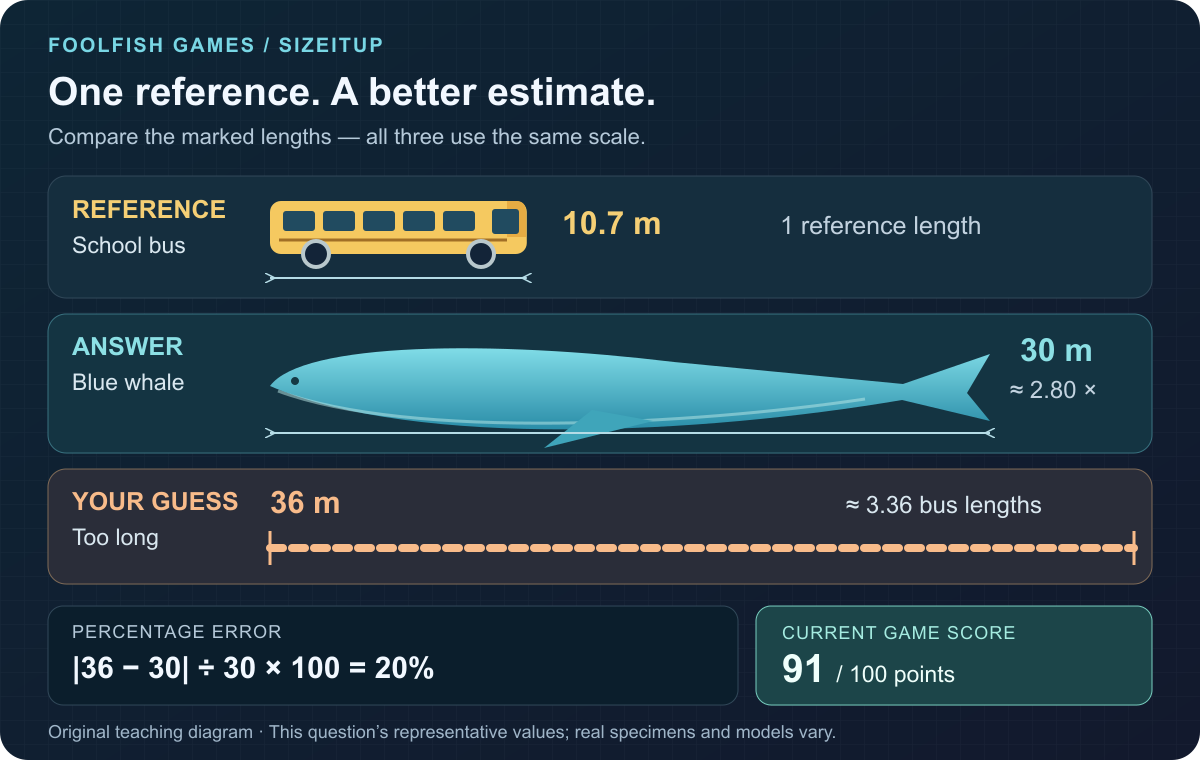
The current Blue whale question uses approximately 30 metres for a large specimen’s body length, with a 10.7-metre school bus as its reference. Divide 30 by 10.7 and you get about 2.80. The target’s marked length should therefore be a little shorter than three reference lengths.
Suppose you instead submit a 36-metre guess. That is about 3.36 bus lengths. The difference from the selected answer is 6 metres; 6 divided by 30 is 0.20, or 20% error. In the current FoolFish scoring rules, this earns 91 points.
The original teaching diagram below uses this question’s selected values. It is a schematic comparison, rather than a captured round or a claim about every whale and bus.
Understand percentage error, not screen pixels
The game calculates absolute difference divided by the selected actual size. It does not calculate error from the reference length or from the number of pixels you dragged. In the whale example, divide the 6-metre difference by the 30-metre answer, not by the 10.7-metre bus.
Equal factors above and below the answer produce different percentage errors. Guessing 15 metres for the 30-metre whale is 50% low and earns 71 points. Guessing 60 metres is 100% high and earns 39. The revealed measurements explain why both are not simply the same “factor of two” mistake.
Within 6% guarantees 100 points. Beyond that, the score decreases linearly toward zero at 160% error, then rounds to a whole number. A slightly larger error can still display 100, so full marks do not prove an exact answer.
Keep camera changes separate from answer changes
The camera zoom buttons change the view of the comparison. Dragging the target changes its position. Neither operation changes the submitted measurement. The gold corner handles, size slider and size minus or plus buttons change the target’s scale, which does affect the answer.
Camera zoom can make awkward comparisons easier to inspect. Then check the marked dimensions again: enlarging both objects improves visibility, not your estimate.
On touch screens, a two-finger resize on the target changes its scale, unlike a camera zoom button. When in doubt, use the size slider and check the relative lengths before submitting.
Build useful anchors from the reveal
After a round, name the mistake in a way you can reuse: “I judged total length instead of shoulder height,” or “I made the target more than three reference lengths when it needed less.” That explanation is more useful than remembering only that the score was low.
Practise one gallery to build familiarity, then try Everything across different subjects. Read each question’s own measurement and reference. A previous answer is a memory aid, not the next round’s automatic ruler.
Try the method in SizeItUp: identify the dimension, choose a ratio, resize, then compare the reveal with your reasoning. Explore other brain-training games for a different observation challenge.
Common questions
Does camera zoom change my SizeItUp answer?
No. Camera zoom changes the view. Resize the target with its handles, size slider or size buttons to change the submitted measurement.
Is error measured against the reference object?
No. Error is the absolute difference between the guess and the selected actual size, divided by that actual size. The reference helps you judge the proportion.
Are the diagram’s whale measurements universal facts?
No. The diagram uses the current game’s selected representative values: a large blue whale body length of approximately 30 metres and a 10.7-metre school bus reference. Real specimens and models vary.