
SizeItUp
How big is a blue whale?
Game details
- Developer
- ChimneyL
- Category
- Puzzle
- Controls
- Mouse · Touch
- Players
- Single player
- Devices
- desktop · mobile · tablet
- Orientation
- Landscape
- Published
- Game build updated
- Listing updated
- Page content updated
Game previews
About SizeItUp
How big is a blue whale? How tall is a rocket? Put your sense of scale to the test in Size It Up! Explore 70 objects across six categories, discover their real-world sizes, and build your collection in this relaxing guessing game.
How to play SizeItUp
Compare the target object with the reference shown.
Drag the gold corner handles or use the slider to resize it.
Click “That’s the size!” to submit your guess.
The closer you are to the real size, the more points you earn.
Complete five rounds, or try Daily five for a new selection each day!
Controls
Mouse
Touch
Compare proportions before fine-tuning
Start with a rough relationship to the reference, then refine it using the slider or gold corner handles. Read which measurement the round is asking you to estimate.
Learn from the reveal
The result gives your estimate context. Notice whether you were a little off or on a completely different scale, then use that comparison when you meet a similar object.
A size comparison game built around a reference
SizeItUp on FoolFish Games is a visual size-guessing game: you estimate a real object's measurement by comparing it with a reference. The useful question is not how large the illustration looks on your screen, but how many reference lengths or heights the target would span. Check the requested measurement before adjusting your answer; a vehicle's length and a building's height are different comparisons.
For a worked example, take a selected blue-whale question using 30 metres and a 10.7-metre bus. The whale is about 2.8 bus lengths, because 30 ÷ 10.7 ≈ 2.80. That ratio gives you a starting estimate before you fine-tune the target. These are the values in that question, rather than a claim that every whale or bus has one fixed size. The SizeItUp ratio strategy guide explains the calculation and common measurement mistakes.
Choose a gallery or try Daily five
The current game contains 70 objects in six categories: Animals, Landmarks, Geography, Nature, Space and Vehicles. Everything is the combined gallery, not a seventh category. Ordinary play draws five different objects for a session from the selected gallery. An object can appear again in a later session, so use the reveal to build a sense of scale rather than expecting a permanently unique sequence.
Daily five selects a date-based set across Everything and changes with the UTC day. You can replay it; it is not a once-only daily roll. Gallery practice is useful when you want to concentrate on one kind of measurement, while Daily five makes you switch between familiar and unfamiliar scales. The controls and Daily five guide covers how the two modes work.
Use percentage error to improve the next guess
Each round can award up to 100 points, for a maximum of 500 across five rounds. The game compares the gap between your estimate and the answer with the answer's size. Missing a 30-metre target by 6 metres is a 20% error; the same 6-metre gap would matter much less for a much larger target. Check both the measurement and the percentage in the reveal.
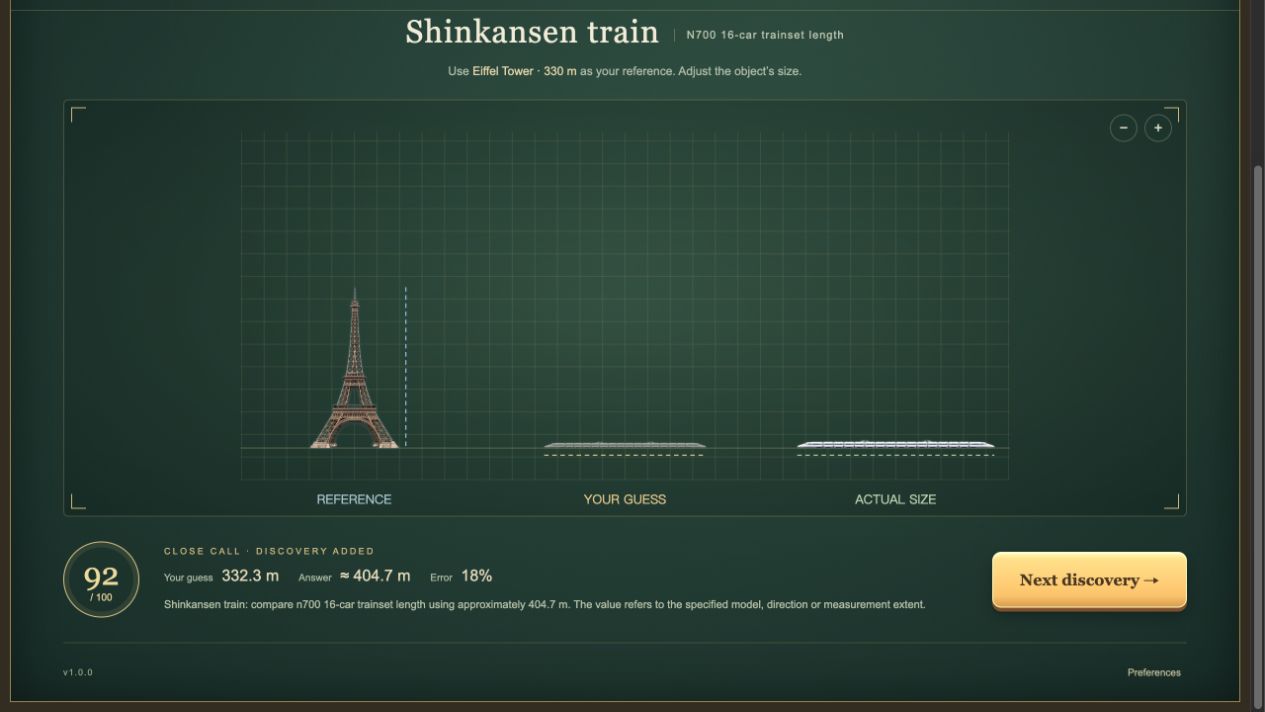
In our recorded Shinkansen N700 question, the estimate was 332.3 metres and the revealed answer was 404.7 metres for the 16-car train. The game displayed an 18% error and awarded 92 points. The lesson is to remember the relevant version of an object as well as its rough scale: a whole train is a different measurement from one carriage. A larger visual zoom does not improve the estimate by itself.
Resize your answer without confusing it with the camera
Drag the gold corner handles, use the size slider or choose the size buttons to change the target estimate. Camera zoom and positioning change the view; they do not change the submitted measurement. When the comparison area has keyboard focus, Left and Right adjust the estimate, Enter submits it and 0 resets while playing. If the keys do nothing, click the comparison area before trying again.
Submit with “That's the size!”, read the reveal, then continue to the next round. Objects enter the collection when you submit a guess, so an imperfect result can still help you learn. For another kind of visual challenge, explore puzzle games; for a daily letter deduction game, try Wordle.
Common questions
Can I play SizeItUp now?
Yes. Use the Play SizeItUp button on this page to open the current FoolFish browser game.
How do I submit my size estimate?
Resize the target with the gold corner handles or slider, then select “That’s the size!”.
Is Daily five the only way to play?
No. The game also offers ordinary five-round play.
How many objects and categories are in SizeItUp?
The current build has 70 objects across six categories. Everything combines those categories. Ordinary sessions contain five different objects, and objects can return in later sessions.
Does camera zoom change my SizeItUp answer?
No. Camera zoom and position change the view. Use the target handles, slider or size buttons to change the estimated measurement.
What is the highest score in a SizeItUp session?
A round awards up to 100 points. A complete five-round session has a maximum of 500 points. The reveal shows how close your estimate was to the answer.
Player reviews
No player reviews yet.